
Managing Customers
The Customers dashboard is your built-in lightweight CRM. SMEPay automatically saves customer details every time someone completes a payment.
Customer Source: Customers are automatically added whether they purchase through Payment Links, Payment Pages, Product Links, or your Mini Store.
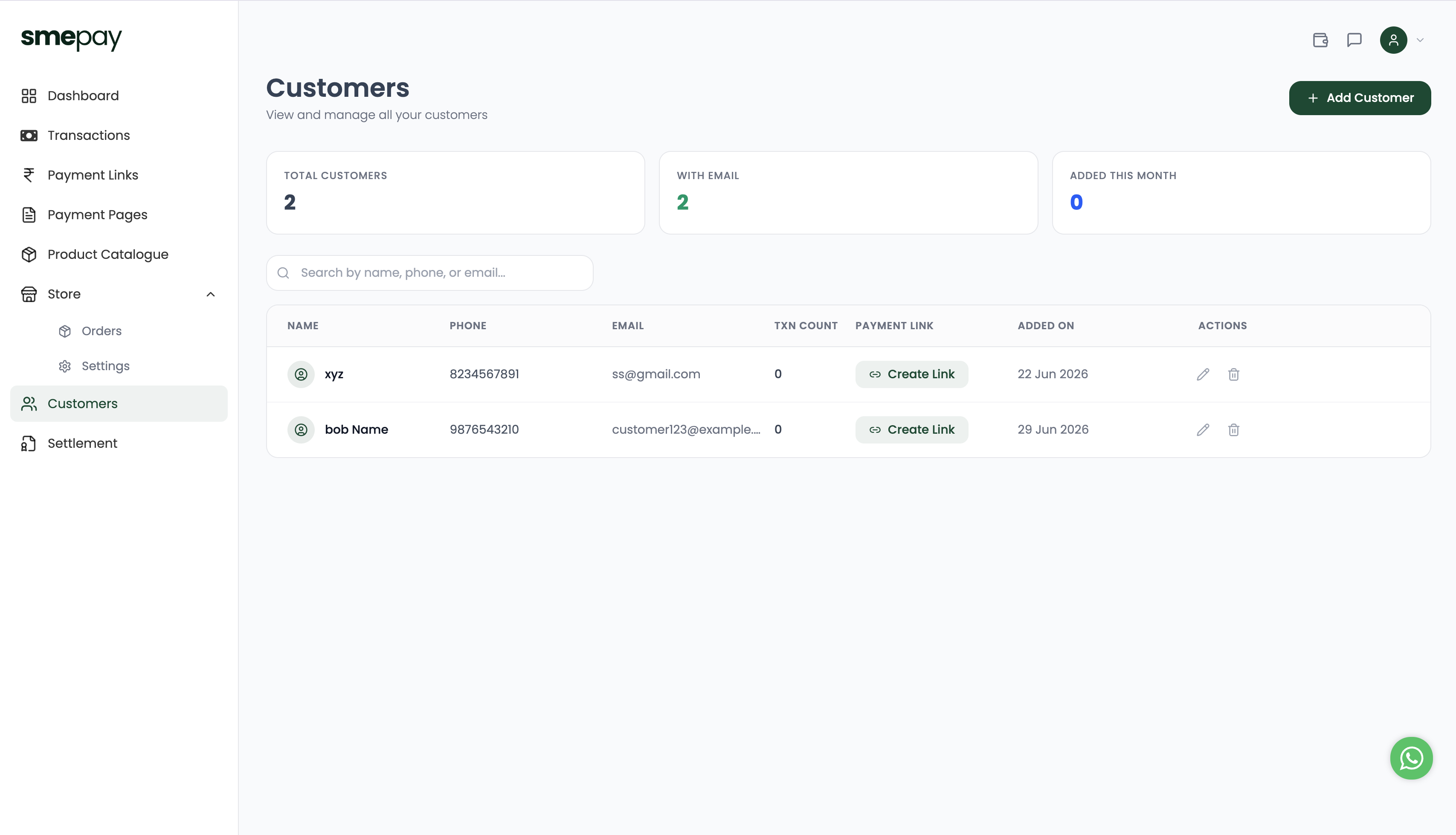
Viewing Your Customers
At the top of the dashboard, you get a quick overview of your customer base:
- Total Customers: The total number of unique people who have interacted with your business.
- With Email: How many customers have provided an email address (great for marketing!).
- Added This Month: Track your growth over the last 30 days.
The Customer List
The main table provides a detailed view of every customer:
- Name, Phone, and Email: Their core contact details.
- Txn Count: How many successful transactions they have completed with you. This helps you easily identify your most loyal, repeat customers.
- Added On: The date they first made a purchase.
Quick Actions
- Create Link: Want to request a specific payment from a past customer? Click the Create Link button next to their name. SMEPay will automatically pre-fill their contact details into a new Payment Link!
- Edit / Delete: Use the pencil and trash can icons to manually update a customer's contact info or remove them from your CRM.
- Add Customer: You can also manually add customers who paid you via cash or other methods by clicking the + Add Customer button in the top right.