
Support Tickets
If you ever encounter an issue with a payment link, need help configuring your Mini Store, or have questions about a settlement, the Support Tickets system is your direct line to the SMEPay team.
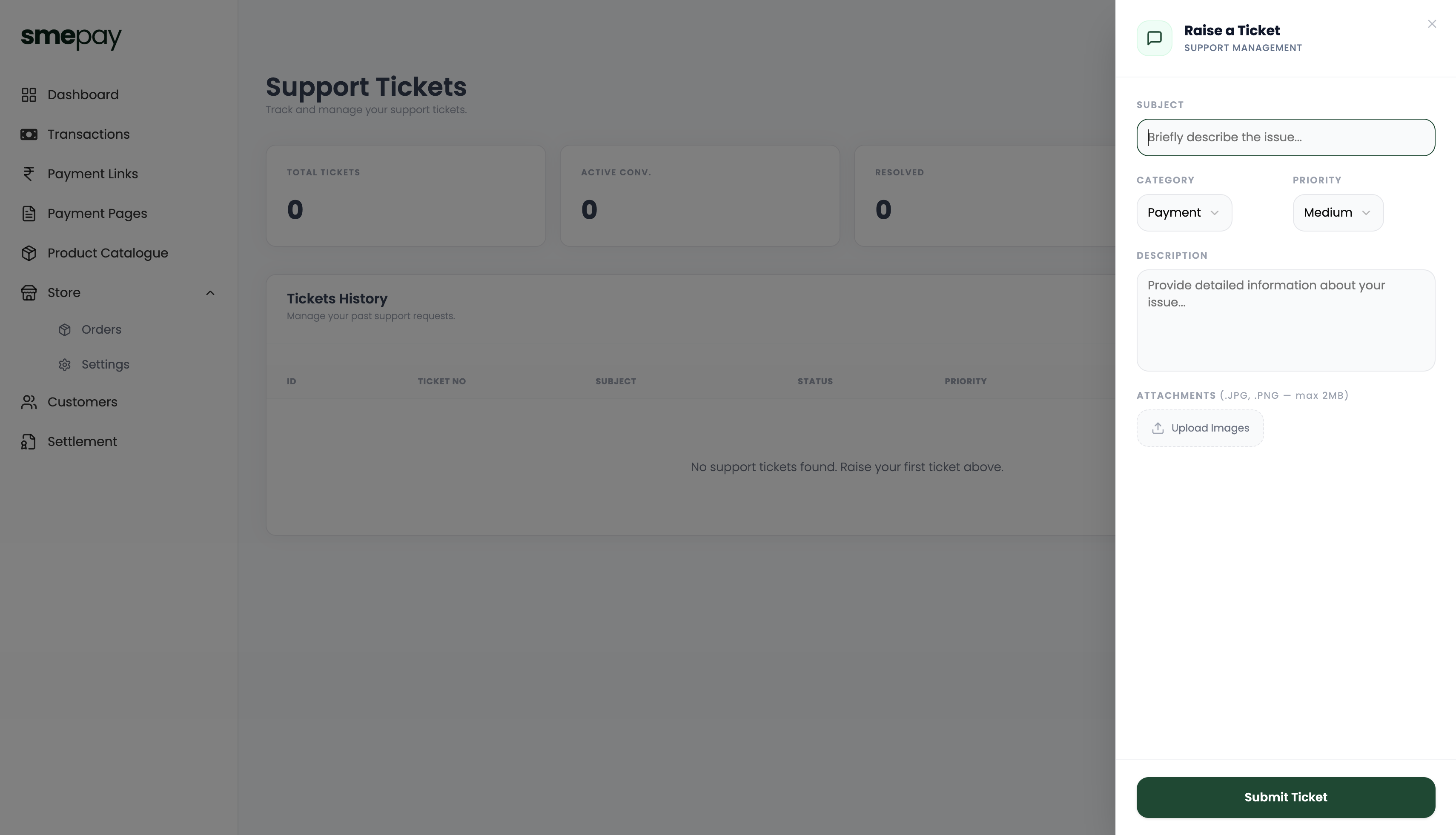
Raising a Ticket
To get help, click the Raise a Ticket button (or click the chat bubble icon in the top right navigation bar).
This will open a side panel where you can provide details about your issue:
- Subject: A brief summary of the problem.
- Category: Help us route your issue to the right team (e.g., Payment, Settlement, Tech Support).
- Priority: Set the urgency level (e.g., Medium, High).
- Description: Provide as much detail as possible so our team can investigate immediately.
- Attachments: You can upload screenshots (JPG or PNG, max 2MB) of the error or issue you are seeing.
Tracking Your Tickets
Once submitted, your ticket will appear in the Tickets History table.
The dashboard provides a quick summary of your support interactions:
- Total Tickets: Your lifetime history of support requests.
- Active Conv.: Tickets that are currently open and being worked on by our team.
- Resolved: Tickets that have been successfully closed.