
Creating Payment Links
Payment links are a quick and easy way to request payments from your customers. You can generate a link with a specific amount and send it directly to them.
How to Create a Payment Link
### Open the Payment Links Page
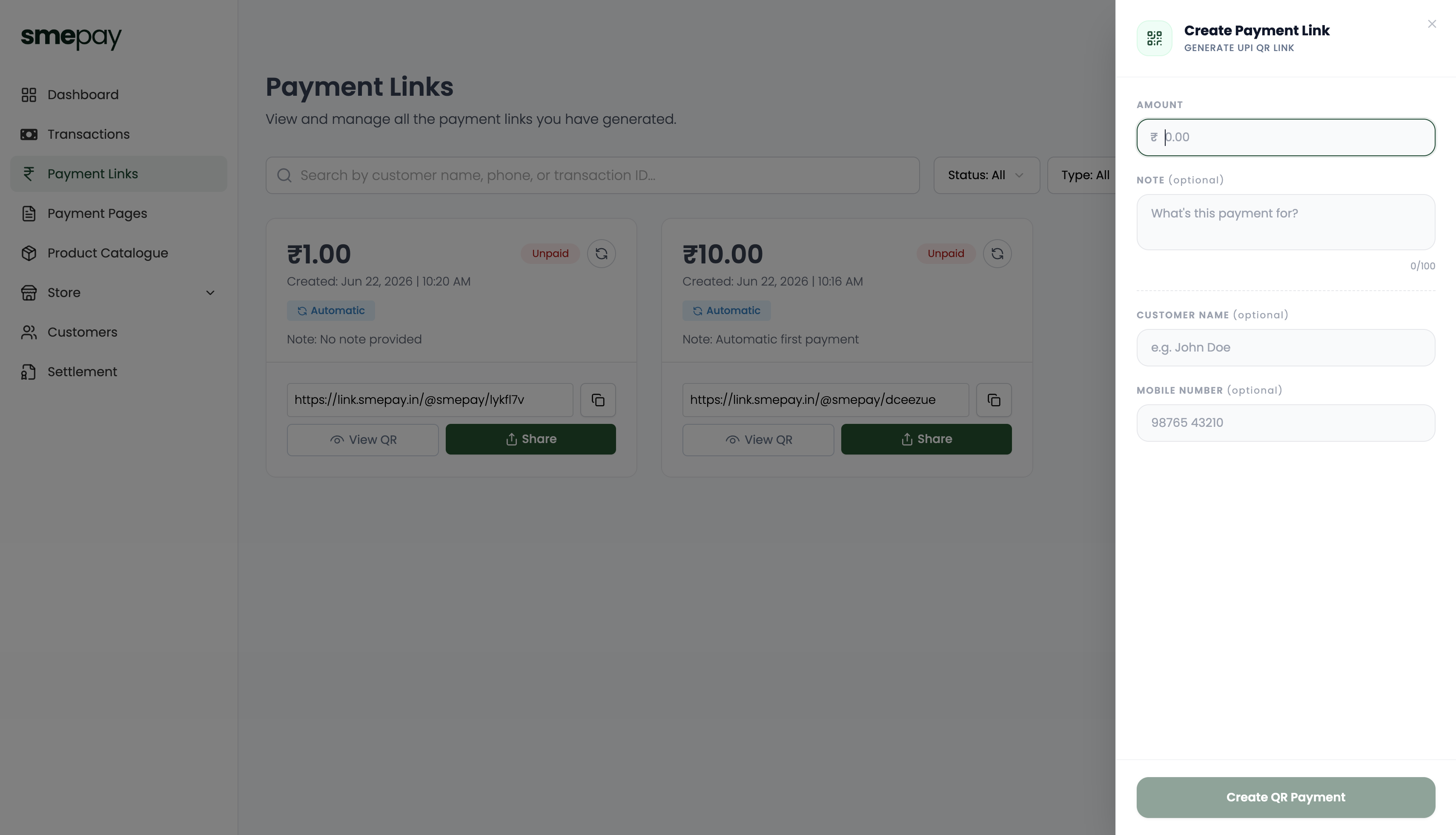
Navigate to **Payment Links** from the left sidebar and click on the **+ Payment Link** button in the top right corner.
Fill in the Details
A side panel titled Create Payment Link will slide out. Provide the following information:
- Amount: Enter the exact amount you wish to collect.
- Note (optional): Add a description of what this payment is for (max 100 characters).
- Customer Name (optional): Enter the name of the customer.
- Mobile Number (optional): Enter the customer's 10-digit mobile number.
Example:
Amount: ₹1000
Purpose: Product Purchase
Customer Name: Rahul Sharma
Mobile: 9876543210
ℹ️
💡 **Tip**
Customer Name and Mobile Number are optional, but adding them allows for easier tracking and direct sharing via WhatsApp.
Generate the Link
Once the details are filled out, click the Create QR Payment button at the bottom of the panel.
✅
Your payment link is now created and ready to be shared with your customer!